
Intro
Tarn & Oak designs and builds contract furniture for hotels, offices and co-working spaces across Europe. Business was growing — and so was the pile of order PDFs nobody wanted to open on a Monday.
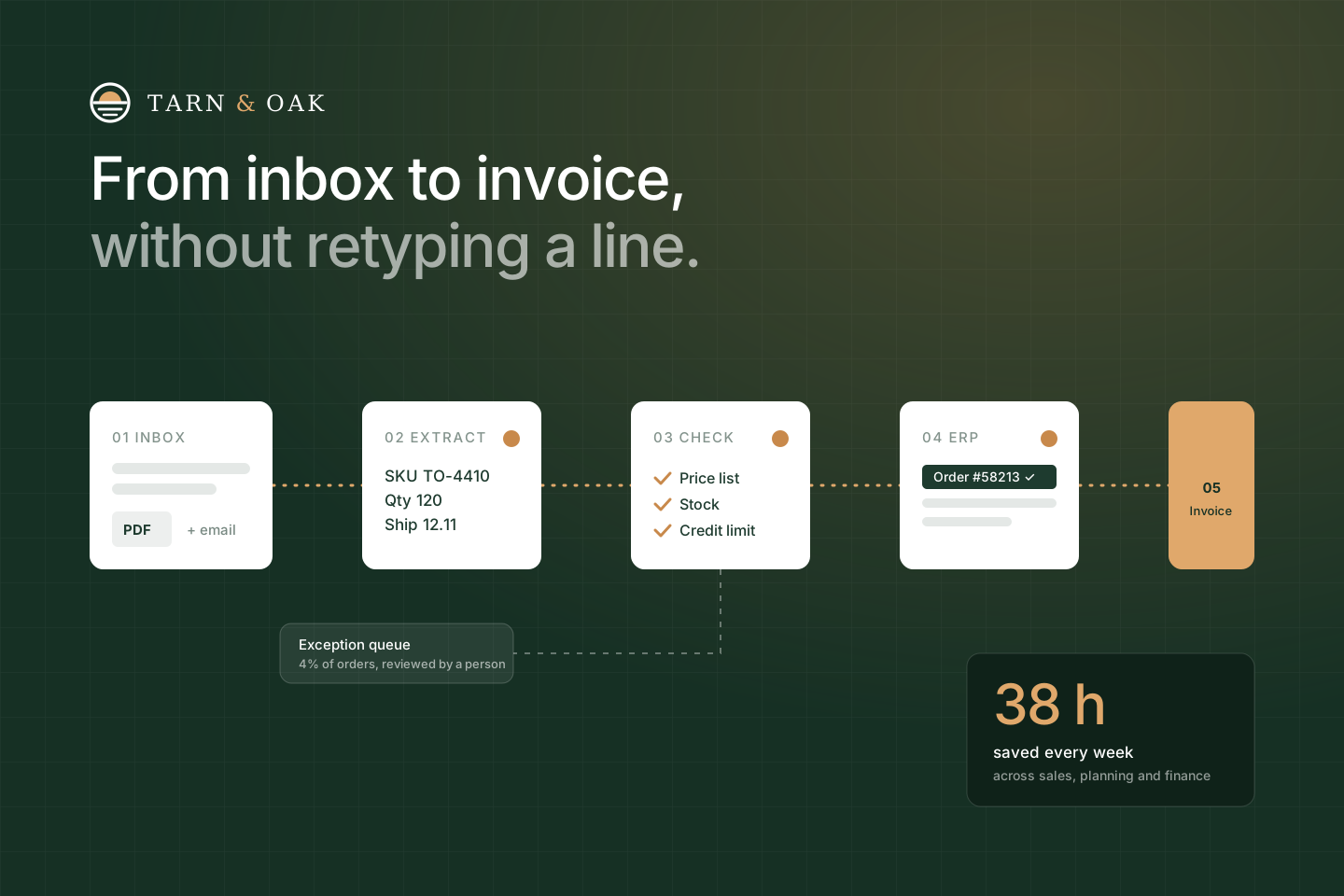
Each order was retyped four times: into the ERP, into a stock sheet, into the workshop schedule and finally into an invoice. We replaced the retyping with one automated pipeline and a small exception queue for the cases that still need a person.
Ten weeks later:
- +52% operational efficiency across order handling
- 38 hours saved every week across sales, planning and finance
- Order entry down from 14 minutes to 90 seconds
Meet Tarn & Oak
Founded in 2009 in Poznań, Tarn & Oak employs 140 people across a design studio and two workshops. Its customers are hotel groups and fit-out contractors who order in volume and expect exact delivery dates.
Orders arrive from dozens of procurement systems as PDFs, spreadsheets and plain emails — no two in the same format. Three teams touched every one of them before a single board was cut.

The challenge we tackled
Four copies of every order
Sales retyped each order into the ERP, planning copied it into a stock sheet and a workshop schedule, and finance keyed it again for the invoice.
Errors found on the shop floor
A mistyped quantity or finish was usually discovered in production — the most expensive place to find it.
No format to rely on
Orders came from more than 40 customer systems, each with its own PDF layout, units and product codes.
Growth meant hiring typists
Order volume was up 30% year on year. The only way to keep up was adding people to do data entry.
I used to start every Monday with sixty PDFs. Now I open the exception queue, clear four or five orders, and I'm done by coffee.
 Lina TranHead of Order Operations, Tarn & Oak
Our approach
01Map the real process
Two days shadowing sales, planning and finance. We timed every step and collected 300 real order documents to build and test against.
02Automate the rules, not the judgement
Document parsing, price-list and stock checks and ERP entry run automatically. Anything uncertain — a new product code, a credit-limit breach — goes to a queue with the reason attached.
03Run in parallel, then switch
For three weeks the pipeline ran next to the manual process. When its orders matched the team's 99.6% of the time, we switched over, one customer group at a time.
Before · one order, by hand
14 min · 3 teams · 2 hand-offs
- 1Read the PDF or email · Sales, 3 min
- 2Retype into the ERP · Sales, 6 min
- 3Check stock in a spreadsheet · Planning, 3 min
- 4Add to the workshop schedule · Planning, 1 min
- 5Key the invoice · Finance, 1 min
After · automated pipeline
90 s per order · no retyping
- Inbox watchedMicrosoft 365 mailbox, every attachment
- Order extractedCustomer, SKUs, quantities, dates
- Rules checkedPrice list, stock, credit limit
- ERP order + scheduleWritten via API, slot booked
- Invoice issuedOn dispatch, same day
4% of orders go to an exception queue with the reason attached — a person decides in under a minute.
We didn't automate everything. We automated the 96% that follows the rules, and made the other 4% easy for a person to decide.
 Maks MiśkowFounder, Pace LabsPace Labs
Inside the pipeline
The team works from one console: what came in, what went straight through, and the handful of orders that need a person — each with the reason and a suggested fix.

Planning something similar? Let's talk it through.
Maks MiśkowFounder, Pace LabsThe results
Within ten weeks every order ran through the pipeline. Three months after launch the team was handling 30% more orders with the same headcount — and hasn't hired for data entry since.
- Operational efficiency — orders handled per person-hour
- +52%
- Saved every week across sales, planning and finance
- 38 h
- Order entry, down from 14 minutes
- 90 s
- Order errors reaching production
- −83%
- Orders processed with no human touch
- 96%
- Payback on the project cost
- 4 mo
Hours per week on order admin
46 h → 8 h
- Sales
- 22 h4 h
- Planning
- 13 h3 h
- Finance
- 11 h1 h
Summary
The biggest change wasn't speed — it was where people spend their attention. Sales talks to customers, planning plans, finance closes the month on time.
The pipeline now handles new customer formats in days instead of weeks, and we keep tuning it with Tarn & Oak's team every month.